
How to Charge the Satisfyer Pro 2 Generation 2
Learn how to charge the Satisfyer Pro 2 Generation 2, how magnetic USB charging works, what to check before charging, and how to care for the charging connection.
-------------------------------------------------------------------------------------------------------------------------
How to Charge the Satisfyer Pro 2 Generation 2
Charging the Satisfyer Pro 2 Generation 2 is straightforward once you know which version you have and how the magnetic charging connection works.
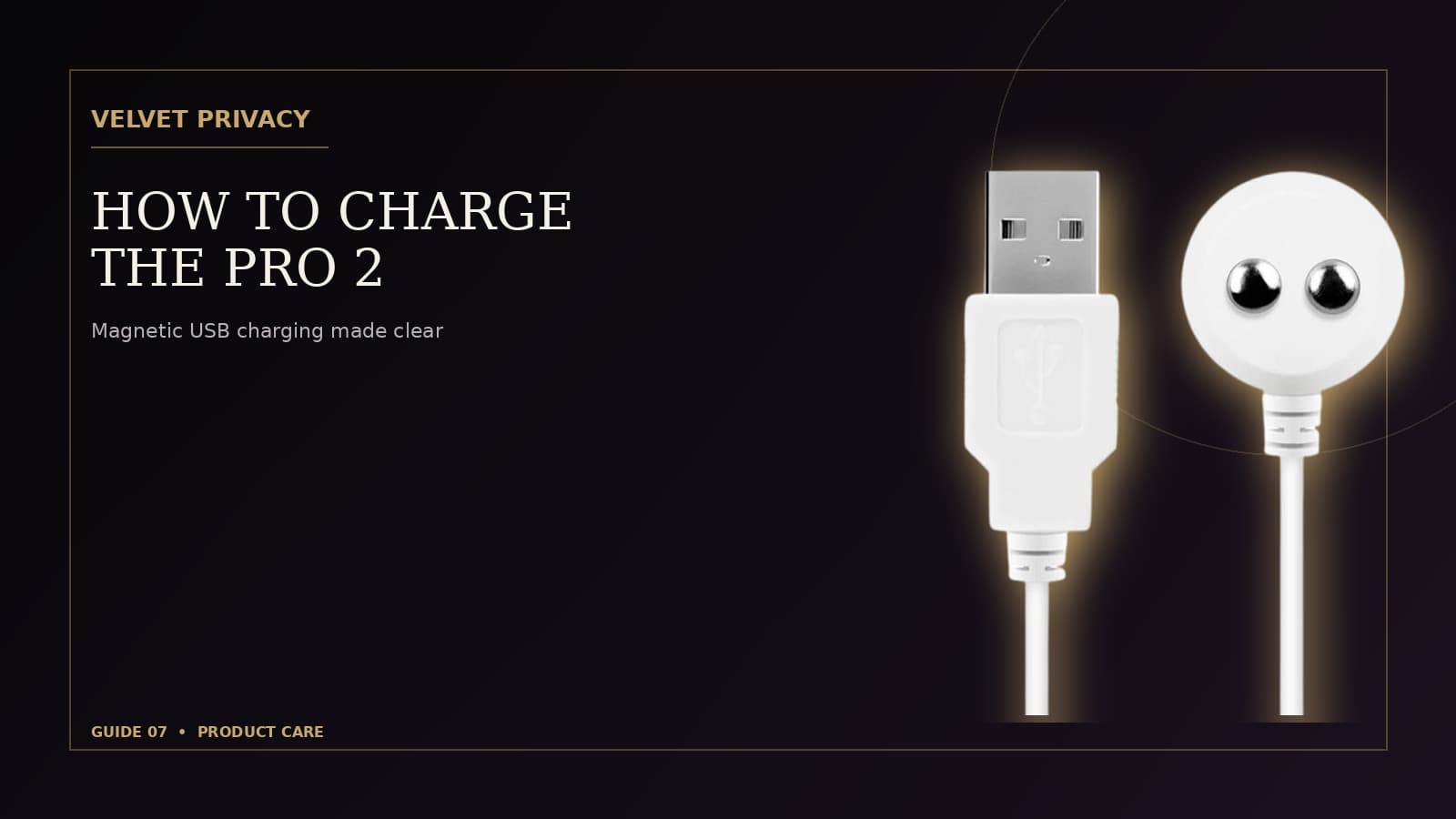
The rechargeable configuration we sell uses a built-in rechargeable battery and magnetic USB charging. Unlike a battery-powered configuration that uses replaceable batteries, the rechargeable version is designed to be connected to its charging cable when the battery needs to be replenished.
This guide explains the basic charging process, what to check before connecting the charger, and how to look after the charging contacts so the connection remains reliable.
First, Confirm You Have the Rechargeable Configuration
Before charging, make sure you have the rechargeable version of the Satisfyer Pro 2 Generation 2.
The rechargeable configuration we sell uses a magnetic USB charging connection. This means the charging cable attaches magnetically to the designated contacts on the device.
This is different from a version that operates using replaceable AAA batteries.
If you are unsure which configuration you have, check the product packaging and the instructions supplied with your device before attempting to charge it.
What You Need
To charge the rechargeable Satisfyer Pro 2 Generation 2, you need:
- The device
- Its compatible magnetic USB charging cable
- A suitable USB power source
Keep the original or manufacturer-supplied charging cable with the device whenever possible. Using the intended cable helps ensure that the magnetic connector aligns correctly with the charging contacts.
Before You Start Charging
There is one particularly important point to remember:
The charging connection should be dry before charging.
The Satisfyer Pro 2 Generation 2 is designed for water-resistant use, but that does not mean the charging connection should be exposed to water while connected to a power source.
If you have recently cleaned the device, dry it thoroughly before attaching the charging cable.
Pay particular attention to the charging contacts and the area surrounding them.
A Simple Pre-Charge Check
Before connecting the cable:
- Make sure the device is switched off.
- Check that the charging contacts are clean.
- Make sure the device and charging area are completely dry.
- Inspect the charging cable for visible damage.
- Position the magnetic connector correctly against the designated contacts.
Taking a few seconds to check these points can help prevent charging problems.
How to Charge the Satisfyer Pro 2 Generation 2
Once the device and charging contacts are dry, charging is simple.
Step 1: Locate the Charging Contacts
Find the designated magnetic charging contacts on the device.
The magnetic connector is designed to attach to these contacts in the correct position.
Step 2: Connect the Magnetic USB Cable
Bring the magnetic end of the charging cable close to the charging contacts.
The connector should attach magnetically and sit against the designated charging area.
Do not force the connector into place.
If it does not appear to align correctly, reposition it rather than applying pressure.
Step 3: Connect the USB End to a Suitable Power Source
Connect the USB end of the charging cable to a suitable USB power source.
Once the device begins charging, its indicator should provide charging-status information.
Step 4: Allow the Battery to Charge
Leave the device connected until charging is complete according to the device's charging indicator and the manufacturer's instructions.
Avoid repeatedly disconnecting and reconnecting the charger while the device is charging unless necessary.
Step 5: Disconnect When Charging Is Complete
When charging is complete, disconnect the USB power source and remove the magnetic connector from the device.
Store the cable somewhere clean and dry so it is ready for the next charging cycle.
What Does the Charging Indicator Mean?
The device uses an indicator to communicate charging information.
However, indicator behavior can depend on the particular product revision. For that reason, the instructions supplied with your Satisfyer Pro 2 Generation 2 should remain the final reference for interpreting the exact light or indicator behavior on your device.
If the indicator does not behave as expected, first check the basic charging conditions:
- The cable is properly connected.
- The magnetic connector is aligned with the charging contacts.
- The contacts are clean.
- The device is completely dry.
- The USB power source is functioning.
- The charging cable is not visibly damaged.
If those checks do not resolve the issue, consult the manufacturer's instructions or support resources rather than attempting to open or repair the device yourself.
Keep the Charging Contacts Clean
The charging contacts are a small but important part of the rechargeable system.
Residue, moisture, or buildup around the contacts can interfere with the magnetic connection.
Regular cleaning of the device helps keep the charging area in good condition.
After cleaning:
- Wipe away any remaining moisture.
- Allow the device to dry completely.
- Check the charging contacts.
- Only connect the charging cable once the charging area is dry.
Do not deliberately immerse or soak the charging connector or charging cable.
Charging After Cleaning
Because the Satisfyer Pro 2 Generation 2 is designed for water-resistant use, cleaning can be part of normal product care.
Charging should still be treated as a separate step.
A simple routine is:
Clean → rinse as appropriate → dry completely → charge.
This keeps moisture away from the charging connection while allowing you to maintain the device properly.
For more information about cleaning the device, see our guide:
How to Clean the Satisfyer Pro 2 Generation 2
Do Not Charge a Wet Device
Water resistance and charging are two different considerations.
Even when a device is designed to withstand exposure to water during intended use, the charging connection should remain dry when connected to power.
If the device has been used in or around water:
- Turn it off.
- Dry the exterior.
- Dry the charging area carefully.
- Allow the device to dry fully.
- Check the contacts before connecting the cable.
If you are uncertain whether the charging area is dry enough, wait longer.
There is no advantage to rushing the charging process.
What If the Magnetic Charger Does Not Stay Attached?
The magnetic connector should align with the designated charging contacts and attach securely enough for charging.
If the connection repeatedly comes loose, check:
1. The Alignment
Make sure the magnetic connector is positioned over the intended contacts.
2. The Contacts
Look for dirt, residue, or moisture around the charging area.
3. The Cable
Check the cable for visible damage.
4. The Power Source
Try a suitable USB power source if the existing one does not appear to be providing power.
5. The Device
If the device still does not charge after these basic checks, consult the manufacturer's instructions or support rather than attempting an internal repair.
Do not open the device to investigate the battery or charging electronics.
Can You Use the Device While It Is Charging?
Charging is intended to replenish the rechargeable battery rather than serve as a normal operating mode.
For safe and predictable use, allow the device to charge as intended and disconnect it before use.
The manufacturer's instructions supplied with your particular device should take precedence if they specify different operating or charging behavior.
How Long Does Charging Take?
Charging time can depend on the battery's remaining charge, the power source, the charging cable, and the particular device revision.
Rather than relying on a generic charging-time estimate, use the charging indicator and manufacturer's instructions for your specific Satisfyer Pro 2 Generation 2.
If the device appears to take significantly longer than expected to charge, check the cable, magnetic connection, charging contacts, and power source first.
Charging and Everyday Storage
A little organization can make rechargeable products easier to use.
After charging:
- Disconnect the charging cable.
- Keep the device clean and dry.
- Store the charging cable somewhere dry.
- Avoid unnecessary bending or pulling of the cable.
- Keep the device away from excessive heat.
- Avoid storing the device with unnecessary pressure placed on the charging contacts.
Keeping the charging cable with the device also makes it easier to maintain a consistent charging routine.
Charging Before Travel
If you are taking the Satisfyer Pro 2 Generation 2 with you, charging it before leaving can be more convenient than waiting until the battery is low.
Before travel:
- Clean the device if necessary.
- Allow it to dry completely.
- Charge the battery.
- Disconnect the cable.
- Pack the device and charging cable separately from liquids.
- Keep the charging cable protected from unnecessary bending or crushing.
If you are travelling internationally, remember that USB power sources and travel adapters can vary by destination. Use a suitable power source compatible with the charging equipment you are carrying.
What About the Battery?
The rechargeable configuration we sell uses a built-in rechargeable battery rather than disposable AAA batteries.
As with other rechargeable electronic products, the battery is an internal component and should not be treated as a user-replaceable part.
Do not attempt to open the device, remove the battery, or perform an internal repair.
If the battery or charging system appears to have developed a fault, use the manufacturer's support or an appropriate service channel.
A Simple Charging Routine
For everyday use, there is no need to make charging complicated.
A practical routine is:
After use: clean the device as appropriate.
After cleaning: dry it completely.
Before charging: check the charging contacts.
During charging: connect the magnetic USB cable correctly and allow the device to charge.
After charging: disconnect the cable and store the device in a clean, dry place.
This simple routine combines charging with normal product care without adding unnecessary steps.
Charging Is Part of Product Care
Looking after the charging connection is just as practical as keeping the device clean.
A rechargeable product depends on a reliable connection between the device and its charging cable. Keeping the contacts clean and dry helps maintain that connection over time.
The key points are simple:
- Use the intended magnetic USB charging cable.
- Keep the charging contacts clean.
- Keep the charging area completely dry before charging.
- Do not force the magnetic connector.
- Check the cable if charging becomes unreliable.
- Do not open or attempt to repair the device.
- Follow the manufacturer's instructions for indicator behavior and charging specifications.
Frequently Asked Questions
How does the Satisfyer Pro 2 Generation 2 rechargeable version charge?
The rechargeable configuration we sell uses a magnetic USB charging connection. The charging connection attaches to the designated charging contacts on the device.
Should the Satisfyer Pro 2 Generation 2 be dry before charging?
Yes. Keep the charging contacts and charging area dry before connecting the charger. If the device has recently been cleaned, allow it to dry completely before charging.
Can I charge the Satisfyer Pro 2 Generation 2 while it is wet?
No. Although the device is designed for water-resistant use, charging should be treated separately. The device and charging contacts should be completely dry before connecting the charging cable.
How do I know when the Satisfyer Pro 2 Generation 2 is charged?
The device uses an indicator to communicate charging status. Indicator behavior can vary by product revision, so the manufacturer's instructions supplied with your device should be used as the final reference.
Does the Satisfyer Pro 2 Generation 2 use replaceable batteries?
The rechargeable configuration we sell is designed to be charged through its magnetic USB connection rather than by replacing disposable batteries.
Final Takeaway
Charging the Satisfyer Pro 2 Generation 2 is a simple process: use the magnetic USB cable, keep the charging contacts clean and completely dry, connect the cable correctly, and allow the rechargeable battery to charge according to the device's indicator and manufacturer's instructions.
The most important habit is also the easiest one to remember:
Clean it, dry it, then charge it.
That small routine helps keep charging separate from water exposure while making everyday product care straightforward.
Explore More
- Satisfyer Pro 2 Generation 2
- How to Clean the Satisfyer Pro 2 Generation 2
- Shipping and Returns
- Privacy at Velvet Privacy
Related Guides
Common Questions,
Clearly Answered.
A concise reference to the questions most relevant to this guide.
How does the Satisfyer Pro 2 Generation 2 rechargeable version charge?
The rechargeable configuration we sell uses a magnetic USB charging connection. The charging connection attaches to the designated charging contacts on the device.
Should the Satisfyer Pro 2 Generation 2 be dry before charging?
Yes. Keep the charging contacts and charging area dry before connecting the charger. If the device has recently been cleaned, allow it to dry completely before charging.
Can I charge the Satisfyer Pro 2 Generation 2 while it is wet?
No. Although the device is designed for water-resistant use, charging should be treated separately. The device and charging contacts should be completely dry before connecting the charging cable.
How do I know when the Satisfyer Pro 2 Generation 2 is charged?
The device uses an indicator to communicate charging status. Indicator behavior can vary by product revision, so the manufacturer's instructions supplied with your device should be used as the final reference.
Does the Satisfyer Pro 2 Generation 2 use replaceable batteries?
The rechargeable configuration we sell is designed to be charged through its magnetic USB connection rather than by replacing disposable batteries.
Related
Guides.
Continue exploring related information from the Velvet Privacy guide library.
Satisfyer Pro 2 Generation 2 Waterproof IPX7: What the Rating Means
A practical guide to the Satisfyer Pro 2 Generation 2 IPX7 waterproof rating, including water use, cleaning, charging, silicone care and what IPX7 actually means.
What Does Discreet Packaging Really Mean?
Learn what discreet packaging actually means, what buyers should expect from a privacy-conscious delivery, and how packaging fits into the wider online shopping experience.
How to Clean the Satisfyer Pro 2 Generation 2
Learn how to clean the Satisfyer Pro 2 Generation 2 properly, including how to clean the silicone head and Air-Pulse opening, rinse away residue, dry the charging area and store the device.
Satisfyer Pro 2 Generation 2 Buying Guide
A complete buying guide to the Satisfyer Pro 2 Generation 2, covering Air-Pulse technology, 11 intensity levels, size, materials, waterproofing, charging, warranty, privacy and everyday ownership.
Air-Pulse vs. Conventional Vibration: Understanding the Difference
Learn how Air-Pulse pressure-wave stimulation differs from conventional vibration, including mechanism, positioning, sensation, intensity control, noise, waterproofing, cleaning and product selection.
Satisfyer Pro 2 Generation 2 Shipping, Returns, Refunds & Warranty Guide
A practical guide to shipping, tracking, returns, refunds, warranty coverage and support for the Satisfyer Pro 2 Generation 2, including what to do when an order or product issue occurs.
More From
Velvet Privacy.
Continue from this guide to the relevant product, technology and support resources.
Continue
Exploring.
Browse the complete guide library for practical information about products, technology, care, purchasing, privacy, payments, shipping and support.